
Dhoni88 login
You know your account exists, but the login screen keeps saying no – or you can't find it at all on your phone. To log in to Dhoni88, open dhoni88bet.com, tap the orange Login button in the header and enter the details you registered with. The button below opens the real login form on the platform.
New to the platform? Create a Dhoni88 account first.
How to log in, step by step
- Go to the right address. Type dhoni88bet.com yourself or use a bookmark. Don't log in through links sent in chats.
- Tap Login. It's the orange button at the top right of the header.
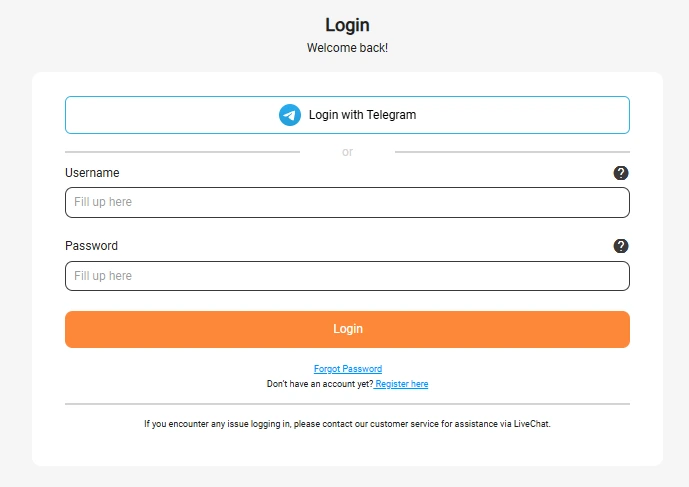
- Enter your username and password. The form asks for the username you chose at sign-up – not your phone number. Passwords are case-sensitive.
- Tap the orange Login button under the form. Your balance appears in the header once you're in.
Logging in with Telegram
The login form also has a Login with Telegram button above the username field. Use it only if you registered with Telegram; it links your Dhoni88 account to your Telegram account, so there's no separate password to type. Never log in through a Telegram message or bot that sends you a link – start from the form on dhoni88bet.com.
Logging in on mobile and in the app
The login is the same whether you use Chrome on Android, Safari on an iPhone or a desktop browser. If you use an app published by Dhoni88, it uses the same account and the same password. There is no separate “app login” or “VIP login” – one account covers everything. See the app guide for installation help.
Forgotten Dhoni88 login password
Tap the Forgot Password link under the Login button and follow the steps. If the reset doesn't work, the login form itself tells you to contact customer service through LiveChat – give them your username and the mobile number you registered with.
- Live chat: 24/7 inside the platform
- Phone: Direct line to the support team, listed in the platform's support section
- Email: For less urgent questions, using the address in the platform's support section
- Languages: English and Bengali
Support will never ask for your current password. Anyone who asks for it in a message is trying to take over your account.
Why your login isn't working
| What you see | Likely cause | What to do |
|---|---|---|
| “Incorrect password” | A typo, caps lock or a phone keyboard auto-capitalising the first letter | Type the password slowly with auto-capitalisation off, or reset it |
| Phone number not accepted | The login uses your username, not your mobile number | Enter the username you chose at sign-up, or ask LiveChat to remind you |
| Login button does nothing | An old cached version of the page | Refresh, clear the browser cache or try another browser |
| Page won't load | Weak connection or a wrong address | Check you're on dhoni88bet.com and switch between Wi-Fi and mobile data |
| Account locked | Several wrong attempts in a row | Wait, then reset your password or contact support |
| Login page looks different from usual | You may be on a copy of the site | Close it, don't enter details, and type dhoni88bet.com directly |
Keeping your login safe
- Bookmark dhoni88bet.com and log in from the bookmark.
- Don't let your browser save the password on a shared phone.
- Change your password if you ever entered it on an unfamiliar site.
- Log out when you finish on any device you don't own.
Dhoni88 লগইন করুন – সংক্ষিপ্ত নির্দেশনা
dhoni88bet.com ওয়েবসাইটে যান, উপরের ডান দিকের কমলা রঙের Login বোতামে চাপ দিন এবং রেজিস্ট্রেশনের সময় দেওয়া তথ্য দিয়ে লগইন করুন। পাসওয়ার্ড মনে না থাকলে লগইন ফর্মের পাসওয়ার্ড রিসেট অপশন ব্যবহার করুন অথবা গ্রাহক সহায়তার সাথে যোগাযোগ করুন। কেউ আপনার পাসওয়ার্ড চাইলে কখনোই দেবেন না।
Login questions
Is the Dhoni88 VIP login different from the normal login?
No. VIP status belongs to your regular account, so you log in the same way as everyone else.
Can I log in on two devices?
You can use your account on a phone and a computer. Log out of any device you're not using, especially shared ones.
Do I need to download anything to log in?
No. The login works in any modern browser without an app.
Last updated: . Facts on this page are checked against the live platform; see the editorial policy.